-
 Draw
Draw
Click to add text
Add heading
Add subheading
Add a little bit of body text
Add curved text
Upload
Image url
Facebook
Instagram
Dropbox
Webcam
Pixabay
Unsplash
Pexels
Freepik
You need to be logged in to upload images!
Click or drop images here
Accept file types: png, jpg, svg, pdf
Max file size: {{settings['nbdesigner_maxsize_upload']}} MB
Min file size: {{settings['nbdesigner_minsize_upload']}} MB
Max upload files: {{settings['nbdesigner_max_upload_files_at_once']}}
Clear all uploaded images
webcam
Facebook
Color
Draw
Shapes
Icons
Flaticon
Stories
Bar/QR-Code
vCard
Grid Frame
Photo Frame
Maps
Combination colors
Aa
Background colors
Free Drawing
Choose
-
{{resource.drawMode.brushWidth}}
Brush color
Default palette
Default palette
Color palette
Your information
Facebook
Draw
Tools
Pencil and Brush draw freehand vector paths. Rectangle supports sharp or rounded corners. Hold Shift for a square. Polygon and Star use Sides.
Appearance
Appearance
Default
Start
End
Brush Style
Brush presets affect new Brush strokes. Calligraphy gives a broad-nib look, Brush Stroke adds taper, Marker stays heavier, and Shape Brush stamps repeated shapes.
Calligraphy Adjustments
These settings affect new Calligraphy strokes only.
Shape Brush
Use built-in Shape Brushes or add custom brush shapes in Settings → PM Draw Tools. You can also save the selected drawing as a custom brush.
Pencil Freehand
These settings affect new Pencil strokes. More smoothness gives cleaner curves. More node reduction keeps fewer points.
Transform
Uniform / Non-uniform Scale
Selection
W
H
Align & Distribute
Distribute
mm
Order
Advanced Editing
Drag to reduce nodes live. Lower it to restore while the same path stays selected.
Double-click a node to remove it. Node Color, Handle Color, and Node Size appear only while Edit Path is active.
Ready.
AI Assistant
Photo Effects
Select an image on the canvas to preview and save professional adjustments and presets.
Color & Tone
0
0
0
0
0
0
Light
0
0
0
0
0
0
Detail
0
0
Finish
1
0
Filter Toggles
Gradient Tint
0
Preset Panel
Built-in presets
Apply a ready-made look with one click.
My presets
Save the current slider settings as reusable presets in this browser.
Document colors
Default palette
Color palette
{{settings.product_data.product[$index].product_width + ' ' + settings.nbdesigner_dimensions_unit}}
{{settings.product_data.product[$index].product_height + ' ' + settings.nbdesigner_dimensions_unit}}
{{stages[currentStage].states.boundingRealSize.size}}
Drop to replace
{{stages[currentStage].states.coordinates.left}} {{stages[currentStage].states.coordinates.top}}
{{stages[currentStage].states.rotate.angle}}
Cut line
Safe zone
Warning
{{stages[currentStage].config.name}}
Out Of Stage
Image Low Resolution
Share this design
- Keyboard shortcuts
- About
| Ctrl +A | Select all layers |
| Ctrl +D | Deselect all layers |
| Ctrl +E | Clear all layers |
| Ctrl +Z | Undo changes |
| Ctrl +Y | Redo changes |
| Ctrl +L | Show/hide Bleed line |
| Ctrl +R | Show/hide Ruler |
| Ctrl +H | Align layer horizontal center |
| Ctrl ++ | Zoom In stage |
| Ctrl +- | Zoom Out stage |
| Ctrl +0 | Fit stage with viewport |
| Ctrl +1 | Resize stage to real size |
| Ctrl +] | Bring layer forward |
| Ctrl +[ | Bring layer backward |
| Ctrl +O | Load your designs |
| Ctrl +B | Make your text bold |
| Ctrl +I | Italicize your text |
| Ctrl +G | Group layers |
| Ctrl +P | Duplicate layers |
| Alt +U | Make your text UPPERCASE |
| Alt +L | Make your text lowercase |
| Alt +← | Move the selected layers to left 1px |
| Alt +→ | Move the selected layers to right 1px |
| Alt +↑ | Move the selected layers to top 1px |
| Alt +↓ | Move the selected layers to bottom 1px |
| Alt + | Free transform |
| Shift ++ | Zoom out selected layers |
| Shift +- | Zoom in selected layer |
| Shift +G | Show/hide Grid |
| Shift +D | Show/hide stage dimensions |
| Shift +L | Clear all guidelines |
| Shift + | Centered scaling |
| ← | Move the selected layers to left 10px |
| → | Move the selected layers to right 10px |
| ↑ | Move the selected layers to top 10px |
| ↓ | Move the selected layers to bottom 10px |
| Delete | Delete selected layers |
| V | Disable drawing mode |
| B | Enable drawing mode |
| Esc | Quit text editing |
| Ctrl +Shift +] | Bring layer to front |
| Ctrl +Shift +[ | Send layer to back |
| Ctrl +Shift +V | Align layer vertical center |
| Ctrl +Shift +I | Import Design |
| Ctrl +Shift +E | Export Design |
| Ctrl +Shift +S | Save Design for later |
| Ctrl +Shift +O | Load Your Design in Cart |
| Ctrl +Shift +G | Ungroup |
| Ctrl +Shift +L | Clear all stages |
| Ctrl +Shift +< | Decreate font size |
| Ctrl +Shift +> | Increate font size |
Image upload terms
Your terms
Delete All Layers
Are you sure you want to delete all layers?
Delete Selected Stage
Are you sure you want to delete selected stage?
Clear All Stages
Are you sure you want to clear all stages?
Replace stage content
By selecting another template you are deleting all the content on the current stage. To restore, click Undo button.
Crop image
Guidelines
Cut Line
This is where we aim to trim the product. The actual line can vary due to the trimming process.
Safe zone
Keep text and important imagery within this line to ensure it does not get cut off during trimming.
My design
Save as new designs or overwrite last design
New design
My designs
My designs in cart
Grid View
{{$index + 1}}
Warning
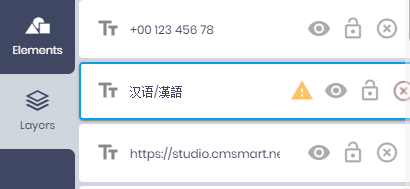
Some fonts you have chosen can not show some of the text you have added. Please choose fonts that is compatible with your language.
Go to <b>Layers tab</b>, check all layers have the exclamation mark:
Products
Your Information
All changes saved
- Double click to edit text
- Right click on selected layers to show context menu
Drag & drop image from sidebar into shape layer to replace the current image.

- Double click masked photo to turn on mask editing mode.
- Click Apply mask icon or click outside selected mask to turn off mask editing mode.